The Loox Reviews Widget lets you showcase customer reviews and store reviews in different layouts throughout your store. By displaying authentic social proof, you can build trust with potential customers and encourage more sales.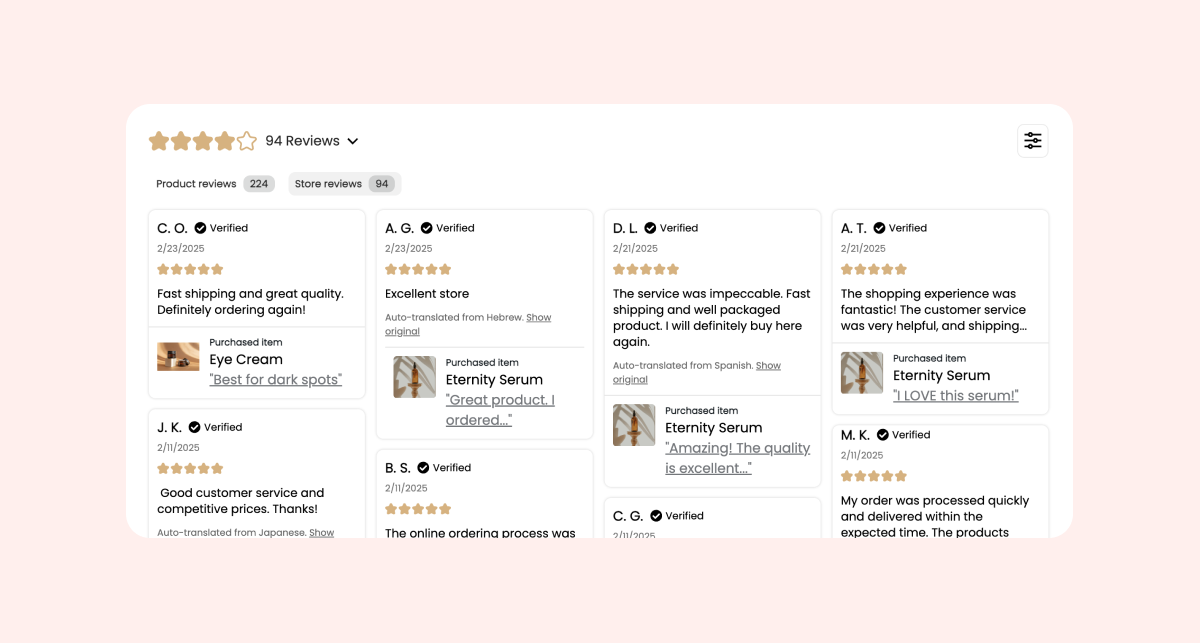
How to add and customize the Reviews Widget
You can add the Loox Reviews Widget directly from your Shopify Theme Editor.
- Inside your Shopify Themes menu, click "Customize" to open the Theme Editor.
- Select the product page template (or any other page) you would like to edit.
- Click "Add section" on the left-side menu, and select "Reviews Widget".
- Drag and drop the widget's app block where you would like it to appear.
- Click "Save".
Customization options
You can tailor the Reviews Widget to match your store’s look and feel:
- Display only reviews with photos/videos – Show reviews that include visual content.
- Show reviews from all products – Display reviews across your entire store instead of only specific products.
- Hide product thumbnails – Remove product thumbnails appearing at the bottom of each review.
- Adjust maximum width – Set the maximum widget of the widget to fit your design.
- Show sample reviews in the Theme Editor – Enable preview mode while editing (sample reviews won’t appear on live pages).
Tip: Customize the Reviews Widget’s appearance to match your brand design.
Choose which reviews to display
The Reviews Widget can display product reviews, store reviews, or both. You control this per widget block directly in your Shopify Theme Editor.
Reviews to display options
Inside the Shopify Theme Editor, under the Reviews Widget settings, select from:
- Both (default) - Display both product reviews and store reviews with tabs. Shoppers can switch between review types.
- Store Reviews Only - Display only store reviews. Best for homepages or dedicated review pages.
- Product Reviews Only - Display only product reviews. Best for product pages when you want to focus on product-specific feedback.

Main tab (when "Both" is selected)
When displaying both review types, choose which tab appears first:
- Automatic (default) - Shows Product Reviews first. If no product reviews exist, Store Reviews will display instead.
- Product Reviews - Always shows the Product Reviews tab first.
- Store Reviews - Always shows the Store Reviews tab first.
Product pages
The Reviews Widget now supports displaying store reviews on product pages. When you set "Reviews to Display" to "Both" or "Store Reviews Only" on a product page template, the widget will display accordingly.
FAQs
Can I display reviews from all products on one widget?
Yes! Enable "Show reviews from all products" in the widget settings.
Do sample reviews appear on my live store?
No, sample reviews are only visible when previewing inside the Theme Editor.
Can I choose to show only Store Reviews on my Reviews Widget?
Yes! In the widget's app block settings in your Shopify theme editor, you can choose to display only product reviews, only store reviews, or both types.